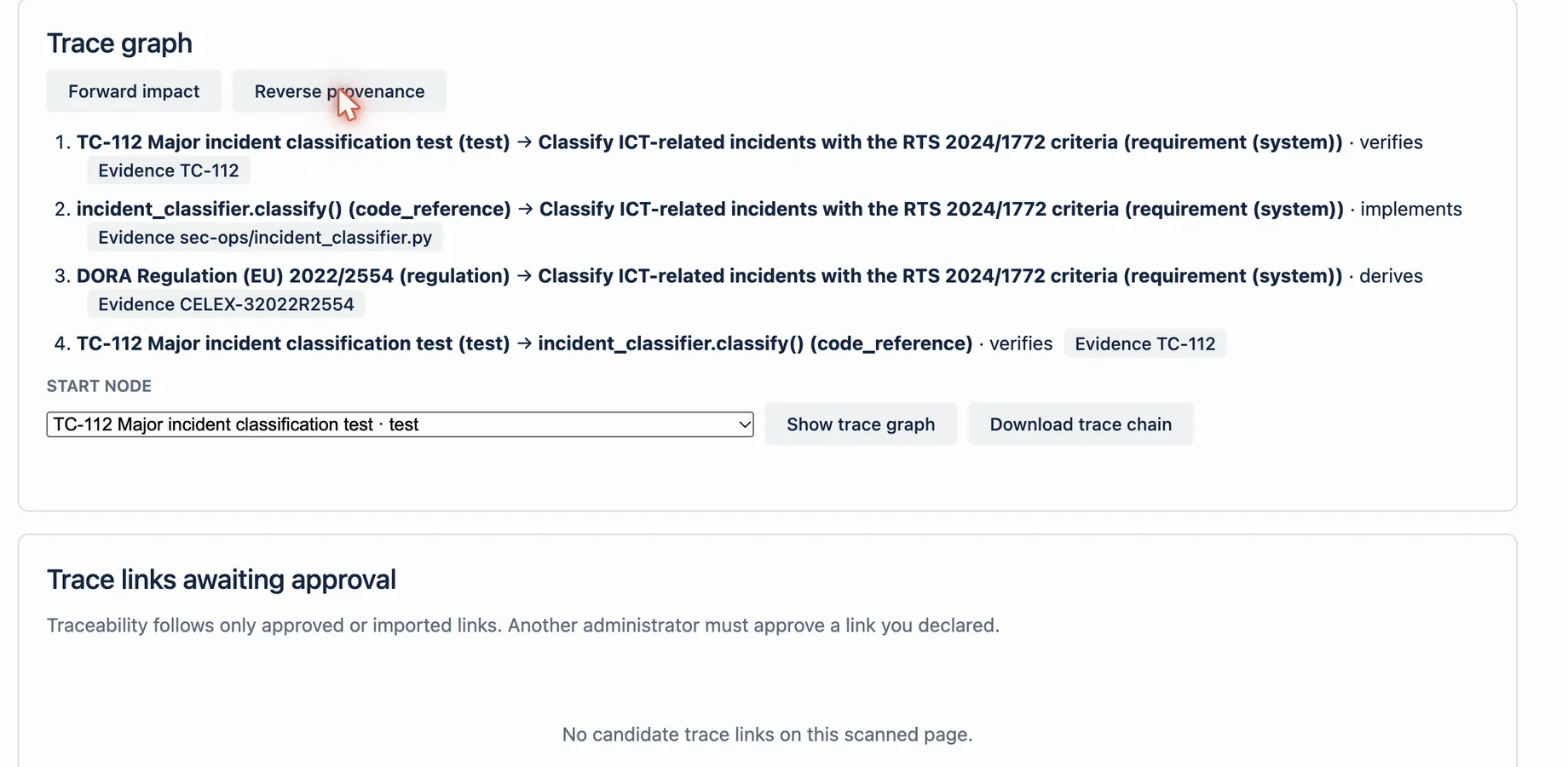
Watch: How to link a test to the regulation behind it (traceability in Confluence)
The embedded player uses YouTube’s privacy-enhanced domain. You can also watch the video on YouTube.
Transcript
How do you prove a test exists because of a regulation? Link them. The regulation derives a requirement, the code implements it, and the test verifies the code. Each link carries an evidence reference, like a ticket or a page ID, and a reason.
At a glance
| Input | Action | Output | Limit |
|---|---|---|---|
| GitHub file or commit URL | Declare trace node with type code_reference | Candidate code-reference node | The app stores the reference you enter. It does not capture or hash the revision. |
| Candidate node or link | Another administrator selects Approve with a Review reason | Governed node or link | The declaring administrator cannot approve it |
| Approved implements link | Follow it upstream to a requirement | Typed implementation hop | A candidate link does not count as evidence |
| Approved derives links | Follow requirement levels upstream | Requirement chain up to the regulation | Only allowed node and relation pairs are accepted |
| Regulation node | Reached as the upstream end | Regulatory root recorded by the team | The app does not interpret legal applicability |
How it works
- Open Terminology Baseline and scroll to Enterprise evidence workspace.
- Use Declare trace node for the code, with type code_reference and its GitHub URL.
- Use Declare trace link to connect it to its requirement with relation implements.
- Ask another administrator to approve in Trace nodes awaiting approval and Trace links awaiting approval.
- In Trace graph, choose the code node in Start node.
- Select Show trace graph, then Reverse provenance.
- Review each hop and its evidence reference, then check Coverage blockers.
Example
A code change alters an incident-classification rule. Its approved code node implements an element requirement. Approved derives links lead to a system requirement and then to the DORA regulation node. Reverse provenance shows that path hop by hop without a query language.
What this does not mean
The trace proves only the relationships people recorded and approved. It does not prove that the regulation applies, that the code is correct, or that every dependency is linked. Production does not import GitHub revisions as trace evidence. Legal interpretation and technical validation remain external responsibilities.
Related questions
Next step
Declare the code node with an exact commit URL and get it approved before relying on its regulatory trace.
View on Atlassian Marketplace